#What you’re building
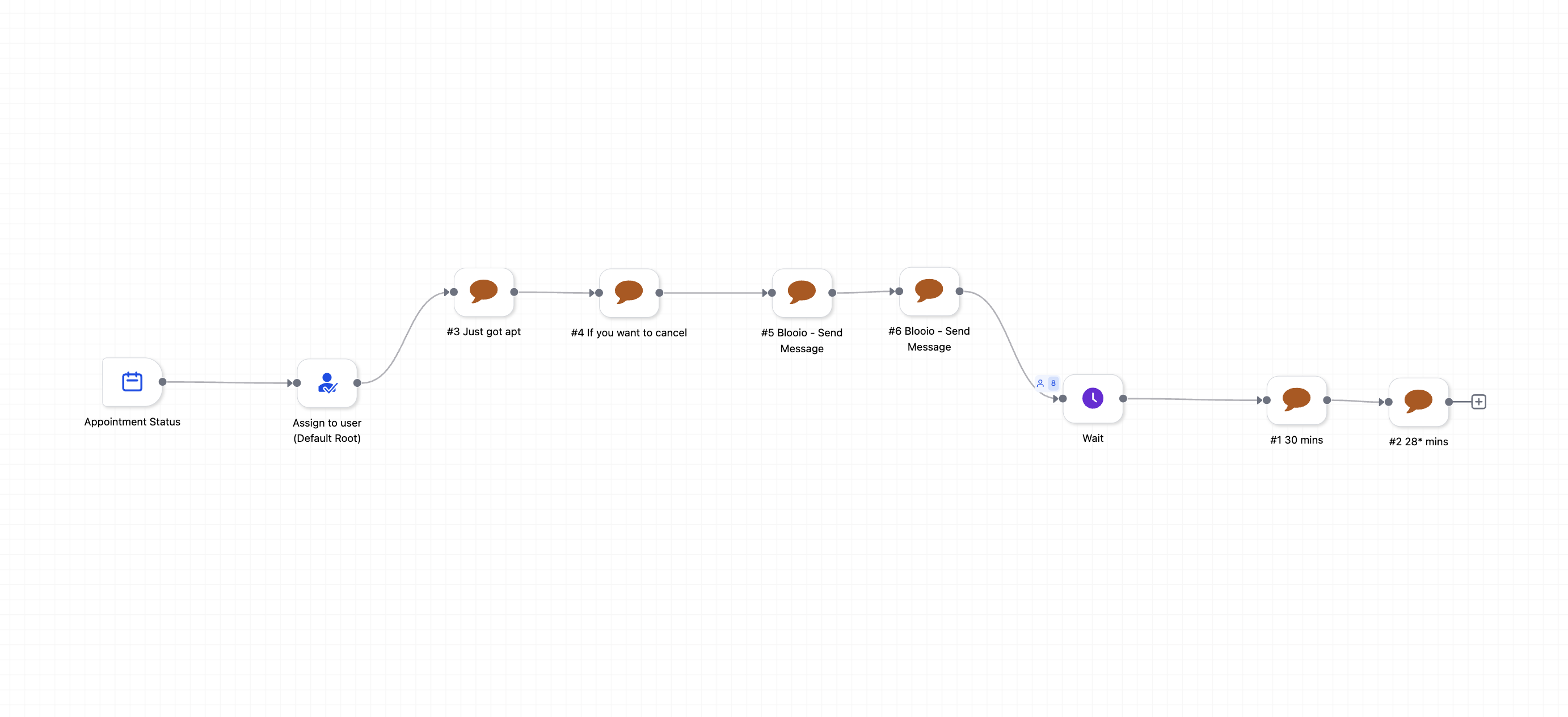
A workflow that:
- Triggers when an appointment is confirmed
- Sends an instant confirmation message
- Sends a quick “need to cancel/reschedule?” message
- Waits until X minutes before the appointment
- Sends a 30-minute reminder
- (Optional) Sends a final reminder a few minutes before start
#Step 1 — Create a new workflow
In HighLevel:
- Go to Automation → Workflows
- Click Create workflow
- Name it something like:
Appointment Reminders (Blooio)
#Step 2 — Add the trigger: Appointment Status
- Click Add New Trigger
- Choose: Appointment Status
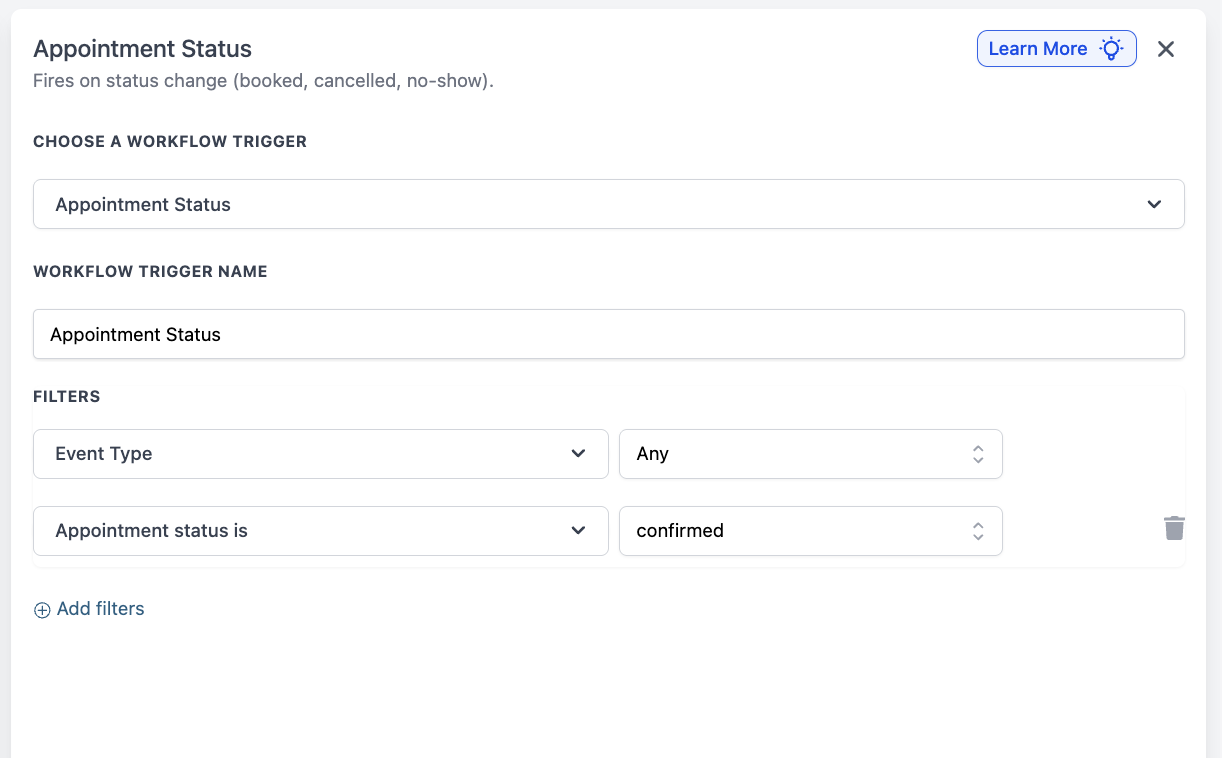
- Configure filters:
- Event Type: Any (or pick the specific calendar/event type you want)
- Appointment status is: confirmed
This matches your trigger settings here:
✅ Now the workflow only fires when the appointment becomes confirmed.
#Step 3 — Assign the contact (optional but recommended)
Add an action right after the trigger:
- Assign to User (ex: Default Round Robin or a specific user)
This is useful so replies route to the correct rep in the conversation view.
#Step 4 — Send the immediate confirmation (Blooio message)
Add an action:
- Blooio – Send Message
Suggested confirmation message (edit to your tone):
“You’re booked ✅ for {{appointment.start_time}}.”
Best practices
- Keep it short.
- Include appointment time.
- Include a stop option (helps reduce complaints + confusion).
#Step 5 — Send a quick “cancel/reschedule” helper message
Add another action:
- Blooio – Send Message
Suggested message:
“If you need to reschedule, just reply ‘reschedule’ and we’ll help.”
(Or include your reschedule link if you use one.)
If you wanna cancel or reschedule click here:{{appointment.reschedule_link}} or text me here too
#Useful variables
javascript
{{appointment.start_time}}
If you wanna cancel or reschedule click here:{{appointment.reschedule_link}} or text me here too
If you wanna add it to your google cal click here {{appointment.add_to_google_calendar}} or if you wanna add it to apple or outlook click here {{appointment.add_to_ical_outlook}}
Here's the meeting link {{appointment.meeting_location}}#Step 6 — Add a “Wait until right before the appointment”
Now we want the workflow to pause and then resume at a specific offset before the appointment time.
Add action:
- Wait
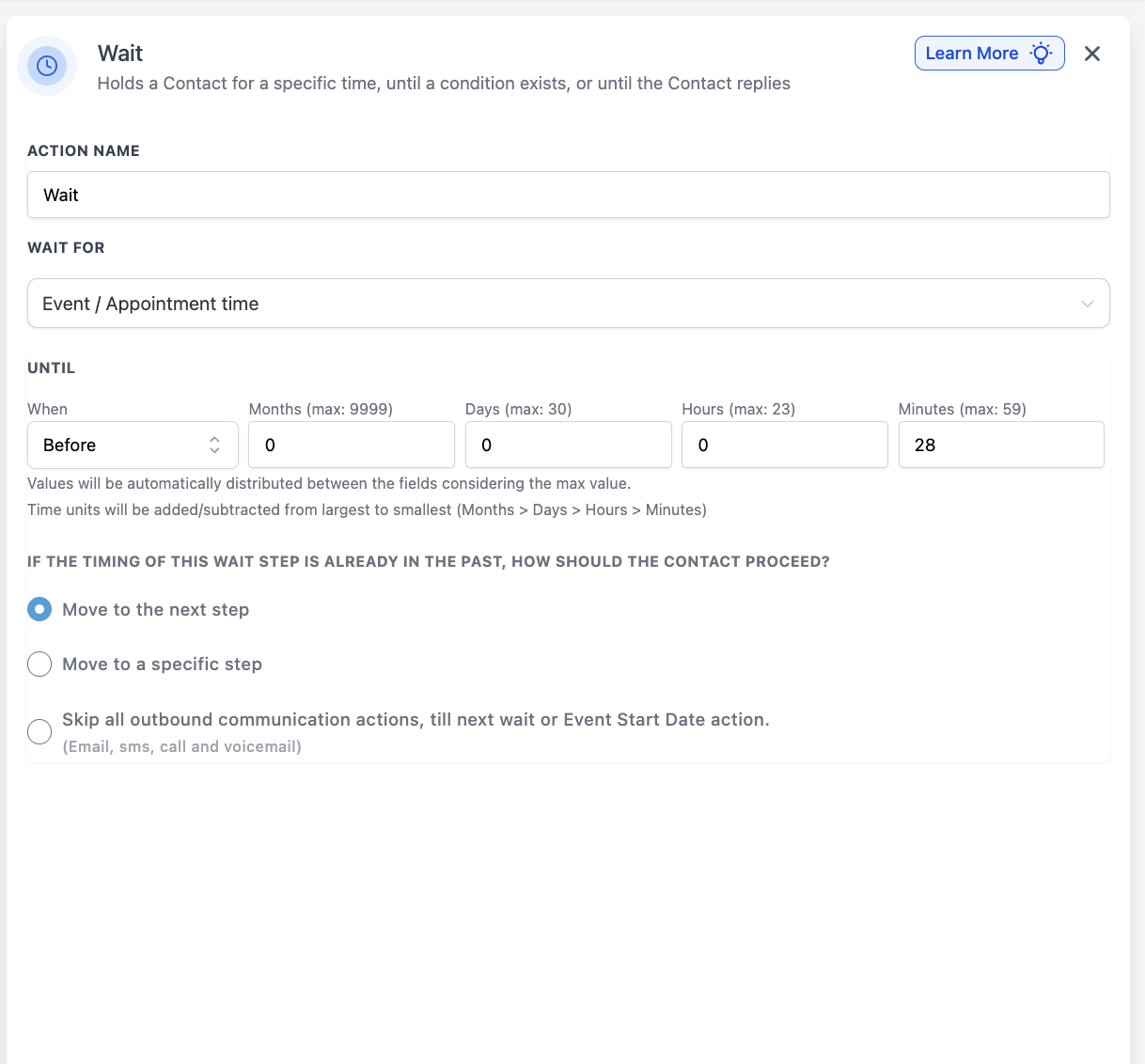
Configure it like this:
- Wait for: Event / Appointment time
- When: Before
- Set your offset (example shown: 28 minutes)
This matches your Wait configuration screenshot:
Important setting:
Leave “If the timing of this wait step is already in the past” → “Move to the next step”
So if someone books last-minute, they still receive the next message instead of getting stuck.
#Step 7 — Send the 30-minute reminder
Immediately after the Wait step, add:
- Blooio – Send Message
Suggested 30-minute reminder:
“Reminder: you’re up in ~30 minutes. Let me know if you need the link”
(“HERE” confirmation is optional, but it increases show-up rate.)
#Step 8 — Optional: Add a final reminder right before start
If you want a second reminder (ex: ~2 minutes before):
- Add another Wait step
- This one should be a relative wait (ex: wait 28 minutes) or another “Event/Appointment time” wait (ex: Before 2 minutes), depending on how you prefer to time it.
- Then add another:
- Blooio – Send Message
Suggested final reminder:
“We’re starting now — here’s the link: {{appointment.meeting_link}}”